Analytics
Dale McGeorge
Head of Product


We gave 11 AI models the same GA4, Search Console and Google Ads data, checked every answer against the truth, and found the mistakes that look exactly like right answers.
A thread on r/analytics recently asked what AI is and isn't replacing in analytics work. The most upvoted reply wasn't about jobs at all. It asked a simpler question: if nobody understands the code, who catches the incorrect join, the flawed aggregation, or the result that's silently wrong? Hundreds of analysts agreed. The hard part isn't writing the query anymore. It's knowing whether you can trust the number that comes back.
We wanted to see how big that problem really is for marketing data. So we built a marketing warehouse where we know every correct answer, gave the same schema and the same questions to 11 AI models, and ran every query they wrote. 528 answers later, the results surprised us in both directions.
The short version: today's models are very good at the textbook questions. The mistakes that remain are harder to catch, because they look exactly like right answers. Every one of the wrong answers below came back as a clean, plausible table, with no error and no warning.
Our test business is Homer's Donuts, a fictional American donut chain with stores in Springfield and Shelbyville. We simulated three months of its marketing one visitor and one session at a time: Google Ads campaigns across two accounts, GA4 web analytics, and Google Search Console. Because we generated every visit, we know the true answer to every question, including figures like deduplicated users that the exported tables can't give you directly.
We loaded the same data in two shapes. The first looks like a typical connector export: one tidy daily table per platform, the kind you get from most reporting connectors. The second uses the layouts of Google's own BigQuery exports: the GA4 event table with nested parameters, the Search Console bulk export, and the Google Ads Data Transfer tables. Each model saw the schema, the date, one line about the business and a question, and wrote one SQL query. We ran each question three times per model and executed every query against the data.
The experiment
Same schema, same questions, every answer checked against the truth
Homer's Donuts is fictional and its data is simulated. Models wrote SQL from the schema alone, without running queries or seeing rows.
Each cell shows how many of a model's three runs got the right answer. Switch between the two warehouses to see how the picture changes when the data looks like Google's own exports.
Scorecard
Correct answers out of three runs, by model and question
We expected to catch models averaging daily ROAS, summing daily users or averaging click-through rates. On the connector tables, that barely happened. ROAS was right in 33 of 33 answers, calculated the proper way as total conversion value divided by total cost. Monthly users were right in 32 of 33. Organic CTR and average position were right in 33 of 33, including weighting position by impressions. When we asked for the "average click-through rate" of the campaigns, a phrasing that invites averaging each campaign's rate, 33 of 33 answers still returned the true account CTR.
That's real progress, and it's worth saying plainly. If you've avoided AI for marketing SQL because you expect it to fumble basic aggregation, the leading models have moved on. The problems we did find are different in kind. They aren't arithmetic slips. They're questions of definition, grain and missing information, and a model can't fix those by being smarter.
Pick a warehouse and a question to see every distinct answer the models gave, how many runs landed on it, which models gave it, and the SQL behind it. Green answers match the truth. Red answers are wrong. Blue answers are defensible but use a different definition from the one we scored against.
Answer explorer
Same question, different answers, and the SQL that produced each one
Loading every answer…
Halfway through September, Homer's renamed its brand campaign from "Brand - Search" to "Brand | Search Springfield". It's the same campaign with the same ID, budget and ads. We asked each model for September spend, sessions and revenue by campaign.
27 of 33 answers grouped by campaign name instead of campaign ID, so the brand campaign appears twice: once for the first half of the month and once for the second. Total spend still adds up, so nothing looks broken. But anyone reading the table sees two half-sized brand campaigns, and any decision about the brand budget starts from the wrong picture.
This is the result that matters most for verification. A common idea is to ask two or three models and trust the answer they agree on. Here, majority voting picks the wrong answer. The models didn't disagree. They shared the same blind spot, because the question doesn't mention the rename and the schema doesn't flag it.
Mistake 1
One campaign, renamed mid-month, reported as two
Spend totals match either way, which is exactly why the split is easy to miss.
| Campaign | Spend |
|---|---|
| Brand - Search | $793 |
| Brand | Search Springfield | $977 |
| Donut Delivery - Search | $5,235 |
| …three more |
| Campaign | Spend |
|---|---|
| Brand | Search Springfield | $1,770 |
| Donut Delivery - Search | $5,235 |
| …three more |
How to check: group by campaign ID, then join the latest name. If a campaign appears twice with half its usual spend, look for a rename.
Next we asked how many users each channel brought in September, plus the total. The connector tables have monthly users for the whole site, but users by channel only exist day by day, and daily users can't be added up into a monthly figure. Someone who visits on three different days is one user, not three.
So there was no correct way to answer this from these tables. Not one of 33 answers said so. 28 of them took the right site total from the monthly table and then summed daily users for each channel, putting organic search at 91,327 users when the real figure is 86,673. Four more added the channels together for the total as well, counting people who arrived through more than one channel twice, and one query failed to run.
One model even wrote a comment in its SQL explaining that users aren't additive across channels, then summed them anyway. It knew the rule. It still had to return a number, because that's what it was asked for. That's worth remembering whenever you ask an AI for a figure: "this can't be calculated from the data you have" is rarely the answer you get back.
Mistake 2
Organic users in September
33 answers, 0 correct, and none flagged that the question couldn't be answered from these tables.
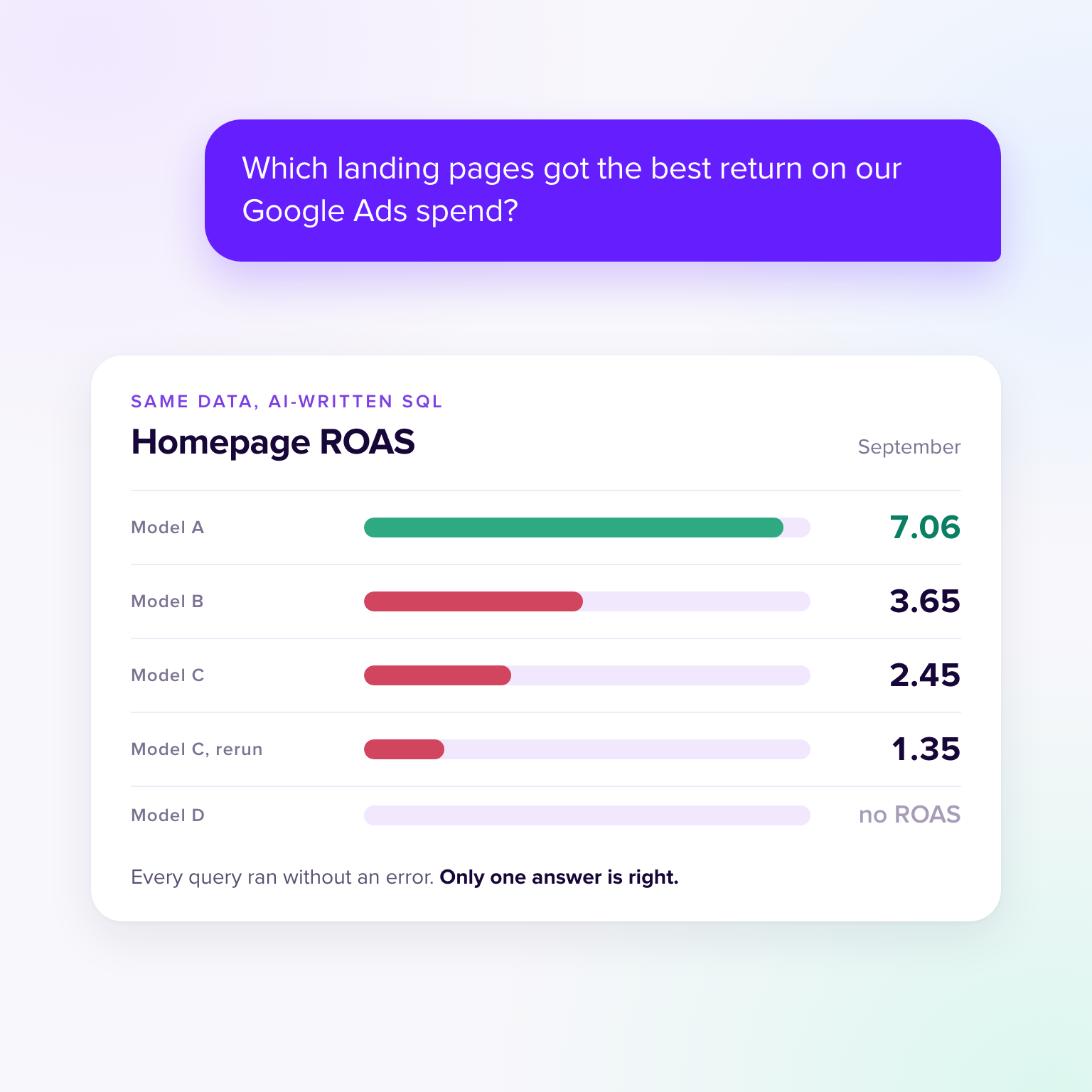
Google Ads doesn't report spend by landing page. To get ROAS by landing page you have to decide how to attribute each campaign's spend to the pages its clicks landed on, then join that to revenue from GA4. It's a question every account manager asks, and it forces a modelling decision.
Most answers got it right: 27 of 33 split each campaign's spend across its landing pages, which gives the homepage a ROAS of 7.06. The other 6 answers split five ways. Two spread all spend across pages by share of sessions, which charges the homepage for clicks other campaigns paid for and halves its ROAS to 3.65. Two joined campaign spend to GA4 rows at the wrong grain, inflating total spend by almost 3 times in one run and more than 13 times in another. One dropped part of the spend, and one declined to estimate spend at all.
The striking part is who gave those answers. GLM 5.2 returned three different homepage ROAS figures in three runs: 7.06, 2.45 and 1.35. Claude Sonnet returned no ROAS, then 3.65, then 7.06. Same model, same prompt, same data. If you only ran the question once, you'd have no idea which version you got.
Many teams that keep marketing data in BigQuery use Google's own exports rather than tidy daily tables. So we ran every question again against the same data laid out like the GA4 BigQuery export, the Search Console bulk export and the Google Ads Data Transfer Service. The answers changed in both directions.
Some problems disappeared. With user-level events available, users by channel went from 0 of 33 correct to 30 of 33. The Google Ads campaign table keeps a daily snapshot of every campaign's name, so most models grouped by campaign ID and showed the current name, and the renamed brand campaign went from 6 of 33 correct to 16 of 33.
Connector tables vs native exports
Correct answers on the same data, laid out two ways
Users by channel
Raw events make distinct users countable for any breakdown.
Spend, sessions and revenue by campaign
The campaign snapshot table carries the latest name, so the rename stops splitting rows.
Google Ads ROAS
The snapshot filter deleted 29 of September's 30 days in some answers.
Paid search conversions
Most answers counted Search campaigns only and left out Performance Max.
Other problems arrived with the new layout. The Google Ads transfer tables include two housekeeping columns, _DATA_DATE and _LATEST_DATE. On the campaign table, filtering to rows where they match is exactly right: it keeps the latest snapshot of each campaign. On the daily stats table, the same filter keeps only the most recent day. 52 answers across 5 questions applied it to the stats, so September's ROAS came back as 1.08 instead of 2.02, built from one day of data instead of thirty.
The snapshot trap
One line, correct on one table and wrong on the next
FROM ads_CampaignBasicStats_5550001111 s
JOIN ads_Campaign_5550001111 c USING (campaign_id)
WHERE s.segments_date BETWEEN '2026-09-01' AND '2026-09-30'
  AND c._DATA_DATE = c._LATEST_DATE   -- latest name per campaign: right
  AND s._DATA_DATE = s._LATEST_DATE   -- keeps only 30 September: wrong
Nothing errors. ROAS falls from 2.02 to 1.08 and conversions from 869 to 13, and the query still looks careful.
Leaving the filter off was worse. The campaign table holds one row per campaign per day, so joining the stats to it without picking the latest snapshot copies every row once for each day in the table. 7 answers did that. Three reported September spend of $1.5 million instead of $16,307. One joined two snapshot tables and multiplied every row by 92 twice, arriving at $138 million for a donut shop's ads. A number that absurd is easy to catch. The same join on a smaller table, or with a narrower date range, would not be.
Search Console had a quieter trap of its own. Its bulk export stores positions zero-based, so the average position needs one added at the end. Two answers left it off and reported an average position of 14.8 instead of 15.8, a difference small enough to pass any eyeball check.
"Paid search" split the models too. 13 of 33 answers counted only campaigns typed as Search and left out Performance Max, which also serves on Google Search. That's a defensible reading, and it changes the conversion count by more than 20 percent. On the connector tables, where campaign type wasn't a column, almost every answer counted all campaigns. The more the schema tells a model, the more decisions it makes on your behalf.
Finally, 20 of 264 native answers simply failed to run, mostly BigQuery syntax that DuckDB doesn't accept. Those are the good failures. You see the error, and you fix it. It's the clean, plausible wrong answers above that deserve your attention.
Put the mistakes side by side and a pattern appears. None of them is a syntax error, and most of them would survive running the query, checking it returns rows, or asking a second model. The renamed campaign fooled nearly everyone in the same way. The channel question had no right answer in the data, and every model produced one anyway. The landing page question had a right answer, and the same model found it one time in three.
What each one needed was a definition decided before the question was asked. What counts as one campaign? Which table holds deduplicated users, and what happens when it doesn't exist? How is spend attributed to a page? An analyst who has been burned before carries those answers around in their head. A model starting from a schema doesn't, so it guesses, and a guess that runs cleanly looks the same as a fact.
You don't need to read every line of SQL to catch these. A few habits catch most of them.
Checklist
Seven checks before you trust an AI-written number
The last item on that list is the one that scales. If every definition lives in someone's head, every new question is a fresh chance to get it wrong. That's the idea behind a semantic layer, or data model: metrics are defined once, centrally, and every query, chart and AI answer uses the same definitions instead of rebuilding them from raw tables.
We made the longer argument in You don't need a more expensive LLM. You need a data model. This experiment is the evidence for it. Better models fixed the arithmetic. They didn't fix the definitions, because definitions aren't something a model can infer from a schema.
In Jepto, Google Ads ratio metrics such as ROAS, CTR, CPC and cost per conversion are defined once in the data model and recalculated from totals, so a report, an AI answer and an MCP query ask for the metric rather than rebuilding it. Every card also shows the exact query behind its number in the Query tab, so checking an answer doesn't depend on reading someone else's SQL.
A data model only helps if its definitions are right, so treat it like any other answer: reconcile it against the platform, and ask how it handles renames, deduplicated users and attribution before you rely on it.
The data is simulated, so treat the exact percentages as illustrations rather than benchmarks. Real accounts are messier, which usually makes these problems worse, not better. Each model wrote one query from the schema alone, without exploring the data first. An agent that can run queries and look at results might catch some of these mistakes, or might simply produce them faster.
Models ran at their default settings. Claude models ran through Claude Code, most others through Cursor, and DeepSeek and Qwen through Fireworks. Queries ran in DuckDB. Each answer was scored automatically against the simulated truth, and we read every group of answers by hand to label the cause. A few answers used a different but reasonable definition, such as counting only Search campaigns as paid search, and we've marked those separately rather than calling them wrong.
Thanks a lot for your feedback! If you’d like a member of our support team to respond to you, please send a message here
Oops! Something went wrong while submitting the form.