
14-day free trial
5-minute setup
No credit card required


Most marketing data sits locked in dashboards that only a few people know how to use. Data Chat changes that by giving every marketer on your team instant access to the insights they need, just by asking. From paid media to SEO to broader strategy, see how Data Chat works for your role below.

 Claude Opus 4.7
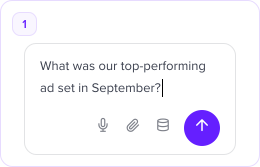
Just type what you need or want to know. No setup or training required. Ask like you'd ask a colleague, as Data Chat is built with a marketing focus.
Plain English questions
Prompt with docs, briefs or URLs
Switch clients in one click
Data Chat references client-specific data like campaign notes, uploaded documents, and performance history to deliver answers that are tailored, not templated.
Live data from 20+ channels
Client KPIs & target benchmarks
Internal docs & site crawl
You can act on the analysis with human-in-the-loop recommendations. Make changes in your ad platforms (with logging and the reason why), or create Google Docs, Sheets, and Slides via MCP.
Pause & adjust campaigns
Generate & publish reports
Create Docs, Slides & Sheets
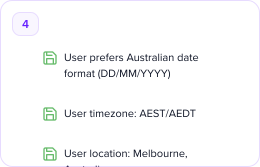
Every conversation is stored. Data Chat builds an in-depth picture of your clients over time, so every new prompt starts smarter than the last.
Persistent conversation history
Searchable past conversations
Context grows with every chat
General-purpose AI with no access to your live marketing data.
Conversational AI built on your live data, client context & MCP tools.
Static dashboards that require you to know what to look for.
Live marketing data
No live data access
Real-time across all channels
Requires scheduled syncs
Cross-channel in one view
Not possible
Google, Meta, LinkedIn & more
Partial — complex to set up
Client KPIs & briefs
No client context
Baked into every response
Not supported
Internal docs & site crawl
Only via plugins
Briefs, Docs, site crawl built-in
Not supported
Natural language questions
Yes, but no live data
Ask anything about your data
Requires SQL or analyst
Proactive anomaly detection
You have to ask first
Alerts when things change
Basic threshold alerts only
Conversation memory
Current session only
Persistent across sessions
No memory
Hallucination-free answers
Can hallucinate freely
Grounded in your real data
Yes, data-backed
Execute campaign changes
Read-only, no actions
Pause, update, optimise via MCP
View only
Generate reports & docs
Manual copy-paste required
One prompt → ready-to-send report
Yes, takes days to set up
Google Docs / Slides / Sheets
Not supported
Create & populate via MCP
Not supported
MCP tool integrations
Limited, no marketing focus
Full stack: Ads, GBP, Drive & more
No MCP support
Setup in minutes
Yes, but no data connection
Connect & go in minutes
Weeks or months
Marketing-specific context
Generic, no marketing lens
Built for marketing teams only
General purpose

 Google Ads
 Facebook Ads
 GA4
GA4 Search Console
 Google Business
 Google Drive
 Microsoft Ads
 LinkedIn
 Slack
Slack TikTok
Just type what you need, it's as simple as that. The model will ask clarifying questions if it needs more information to produce the best output.
Plain English questions
Prompt with docs, briefs or URLs
Switch clients in one click
Gekko Toys
 RaceEx
 Homer's Donuts
Data Chat references client-specific data like campaign notes, uploaded documents, and performance history to deliver answers that are tailored, not templated.
Live data from 20+ channels
Client KPIs & target benchmarks
Internal docs & site crawl
Gekko Toys
…your ROAS target of 4× was met on Google Ads but missed on Facebook by 1.2×…
RaceEx
…ROAS dropped to 2.8× in the last week due to increased CPCs on brand terms…
Approve a recommendation and Data Chat executes it, along with recording why the action was taken so you can look back on changes with clarity.
Pause & adjust campaigns
Generate & publish reports
Create Docs, Slides & Sheets

 Anthropic
 Amazon

 Google

 OpenAI
 Meta
Meta

 X AI
X AI

See exactly how many AI credits you've used, understand what's driving consumption, and stay confident that your client data never leaves your control.
Claude Haiku 4.5

Paid spend is up 14.2% WoW. Google Ads leads at $4.1k, Facebook stable at $2.3k.
Spend by channel — this week
Data Chat is a conversational AI built specifically for marketing teams. Unlike general AI chatbots like ChatGPT, it's connected to your live marketing data like Google Ads, Meta, GA4, Google Business Profile, and more so every answer is grounded in your actual numbers, not generic training data. It also knows your clients, their KPIs, their briefs, and their history, and unlike general AI, you choose the model powering each conversation.
Data Chat connects to 20+ channels including Google Ads, Meta Ads, GA4, Google Search Console, Google Business Profile, Microsoft Ads, LinkedIn Ads, TikTok Ads, Google Drive, and Slack. New integrations are added regularly. You can see the full list on the MCP Connectors page [link] and if a platform you need isn't there yet, you can request it on the roadmap.
Not at all. Data Chat is designed for marketers, not developers. You ask questions in plain English like "Which campaigns wasted the most budget last month?" and get answers instantly. No SQL, no dashboards to build, no analyst required.
Both. Data Chat can analyse your data and act on it. Via the Jepto MCP, it can pause underperforming campaigns, generate reports in Google Docs or Slides, and push updates to Slack all from within the conversation. You approve, it executes.
Yes. Data Chat works across leading AI models from Anthropic, Google, OpenAI, Meta, and others and you can switch between them per conversation without losing any context, history, or client data. Use a faster, lighter model for quick lookups and a more capable one for deep analysis. We keep the model list updated as new versions are released, so you always have access to the latest without any configuration changes.
AI Credits are how we measure the cost of AI model usage within Data Chat; different models consume credits at different rates, with lightweight models using far fewer than frontier models like Claude Opus. Each plan includes a monthly credit allowance, and your usage dashboard shows exactly where credits are going. If you need more, additional credits are available, and because you choose the model per conversation, you're always in control of how quickly you use them.
Most teams are up and running in under 10 minutes. Connect your data sources, set up a client workspace, and start asking questions — that's the entire setup. No training required, no developer needed — if you can type a question, you can use Data Chat.
Connect your first data source in minutes. No SQL, no dashboards, no training required.


