Building your own marketing dashboard with AI? Include these prompts.
Dale McGeorge
Head of Product
21
min read
Building the dashboard is the easy part. Getting the data underneath it right is where the real work is. Copy these prompts into your AI of choice to talk through access, idempotent syncs, definitions, verifiable queries, permissions and more so you have a clear understanding of any future issues.
AI is great at building, make sure that is has the right approach
Ask Claude or ChatGPT for a marketing dashboard and you'll have something good in minutes: KPI tiles, a trend line, a campaign table pulling live from the Google Ads API. We do this ourselves, and it's genuinely one of the better things to happen to people who work with marketing data.
The catch is that AI builds what you ask for. Ask for a dashboard and you get a dashboard. You don't get retry logic for rate-limited requests, an upsert that stops a re-run from doubling yesterday's spend, or a test proving one brand can't see another's data, unless you ask. A recent video on whether AI-built apps will replace BI tools put it neatly: AI gives you the ability to build before it gives you the experience that usually comes with it, so on day one you don't know what you're missing.
The good news is that the same model that skipped these topics knows them very well. So this guide doesn't try to scare you off building. It gives you the prompts we'd want a capable engineer to work through, in the order the problems tend to show up. Paste them into your own AI, against your own plan or code, and let it do the thinking with you.
One distinction helps before you start. A reporting dashboard is really two jobs. The first is the data layer: getting access to each platform's API, syncing reliably, storing the results, and making the numbers mean the same thing everywhere. The second is the reporting layer: logins, charts, sharing and delivery. Most AI tutorials skip straight to the second, because it's the part you can see. The first is roughly four times the work and holds the most expensive mistakes, so the prompts start there.
First, know which level you're building for
Not every dashboard needs every prompt. A personal dashboard on your own data doesn't need share links or DKIM records. The risk grows each time a dashboard starts serving a wider audience, so it helps to decide up front which level you're building to. Each prompt below is tagged with the level where it starts to matter.
The reporting dashboard maturity model
Each level serves a wider audience, and inherits every requirement below it
Level 1PersonalOne analyst, their own data, exploring.
Watch forThe prototype quietly becomes the product.
Level 2SharedColleagues and stakeholders can open it.
Watch forAnyone with the link sees everything.
Level 3StandardisedMany dashboards, many accounts, more than one builder.
Watch forThe same metric, calculated three ways.
Level 4DeliveredBranded, scheduled, read outside your team.
Watch forThe monthly report lands in spam.
Level 5ConnectedThe same numbers answered in Claude, ChatGPT and agents.
Watch forThe chat answer and the dashboard disagree.
At every level: syncs, upkeep and ownership. Ad platform APIs change, dependencies reach end of life, and the person who built it eventually moves on.
The prompts in this guide
Start with a scoping interview. Before any code
Make syncs safe to re-run. API access, idempotency, rate limits, backfills
Make your numbers match the platforms. Definitions, units, time zones, governance
Know whether the query is right. Spreadsheets, CRMs, verifiable queries
Give each person the right access. Roles, row-level permissions, secrets, sharing
Send every report exactly once. Domains, DKIM, schedules, PDFs
Pick the chart that answers the question. Chart types, formats, accessibility
Read the licences before launch. Chart library, APIs, open source, fonts
Know who changed what, and undo it. Change logs, environments, rollback
Give AI access without a second truth. MCP, scoping, confirmations
Notice when it breaks. Monitoring, handover, upkeep
Red-team the whole thing. A final review prompt
Start with a scoping interview instead of a build request
The most common mistake is the first prompt: "build me a marketing dashboard". It invites the model to make every architectural decision silently, optimised for a demo. Ask it to interview you instead, so the decisions that matter are made out loud.
Prompt · Scoping · Any level
Before writing any code, interview me about the marketing dashboard I want to build. Ask one question at a time and wait for my answer.

Cover: who will open it (just me, my team, people outside my company); how many brands or ad accounts it will hold; which platforms it pulls from (Google Ads, Meta, GA4, LinkedIn, etc.); how fresh the data needs to be; whether it will be emailed, shared by link or exported as PDF; whether anyone will want the same numbers inside an AI assistant; and who will maintain it in a year.

When you have enough, tell me which maturity level this is (personal, shared, standardised, delivered, connected), list the non-functional requirements that level implies (security, reliability, compliance, operations), and flag anything I've asked for that is easy to demo but hard to run. Then propose an architecture and wait for my approval before writing code.
How we solved it
We had this conversation once, for every agency at once. Jepto is built for the delivered and connected levels from the start, so the plumbing questions are already answered and the remaining decisions are about your data and your reports.
Mistake 1: Refetching data accidentally doubles yesterday's value
Before the first sync even runs, you need access: a Google Ads developer token, Meta's app review and business verification, OAuth consent verification for Google's analytics APIs, and an access request for Business Profile. Then the sync itself. AI-written sync scripts usually insert rows. Run one twice, or let it retry after a timeout, and the same day is counted twice. Meanwhile ad platforms throttle requests, paginate large reports, restate recent days as conversions arrive late, and switch off API versions on a schedule. None of that shows up in the first test run.
Prompt · Data syncs · From Level 1
Review the data sync for my marketing dashboard as a senior data engineer. For each platform I pull from, explain how the design handles:

1. Idempotency: if a sync for the same account and date range runs twice, or retries halfway through, is the result identical? Show the natural key you would upsert on (account, date, campaign, etc.) and how partial failures are rolled back or resumed.
2. Rate limits and quotas: the platform's documented limits, how we detect a throttled response, and exponential backoff with jitter. What happens when a quota is exhausted mid-run?
3. Pagination and large accounts: how we page through results without missing or duplicating rows.
4. Late and restated data: how many trailing days we re-pull each run, because conversions and costs are revised after the fact, and how we backfill history without blowing quotas.
5. Token refresh and revoked access: what happens when an OAuth token expires or a user removes access, and who gets told.
6. API versions: which version we call, when it sunsets, and how we'll know before it does.
7. Access and other sources: the developer access level, app review or verification each platform requires before I can use production data, and how spreadsheets, CSVs and databases will be imported and validated alongside the APIs.

Point out anything in my current code that would silently produce wrong numbers rather than fail loudly.
How we solved it
Connections are managed for you. Jepto refreshes platform tokens automatically and emails whoever connected a source if access is revoked. When a platform adds a field we pick it up and backfill where we can. When one is removed, the history is kept, and later syncs skip it. Version migrations happen on our side, and the MCP flags sources that are still syncing so partial data is called out so you don't take action on incomplete data.
Mistake 2: Your numbers don't match the ad platform's
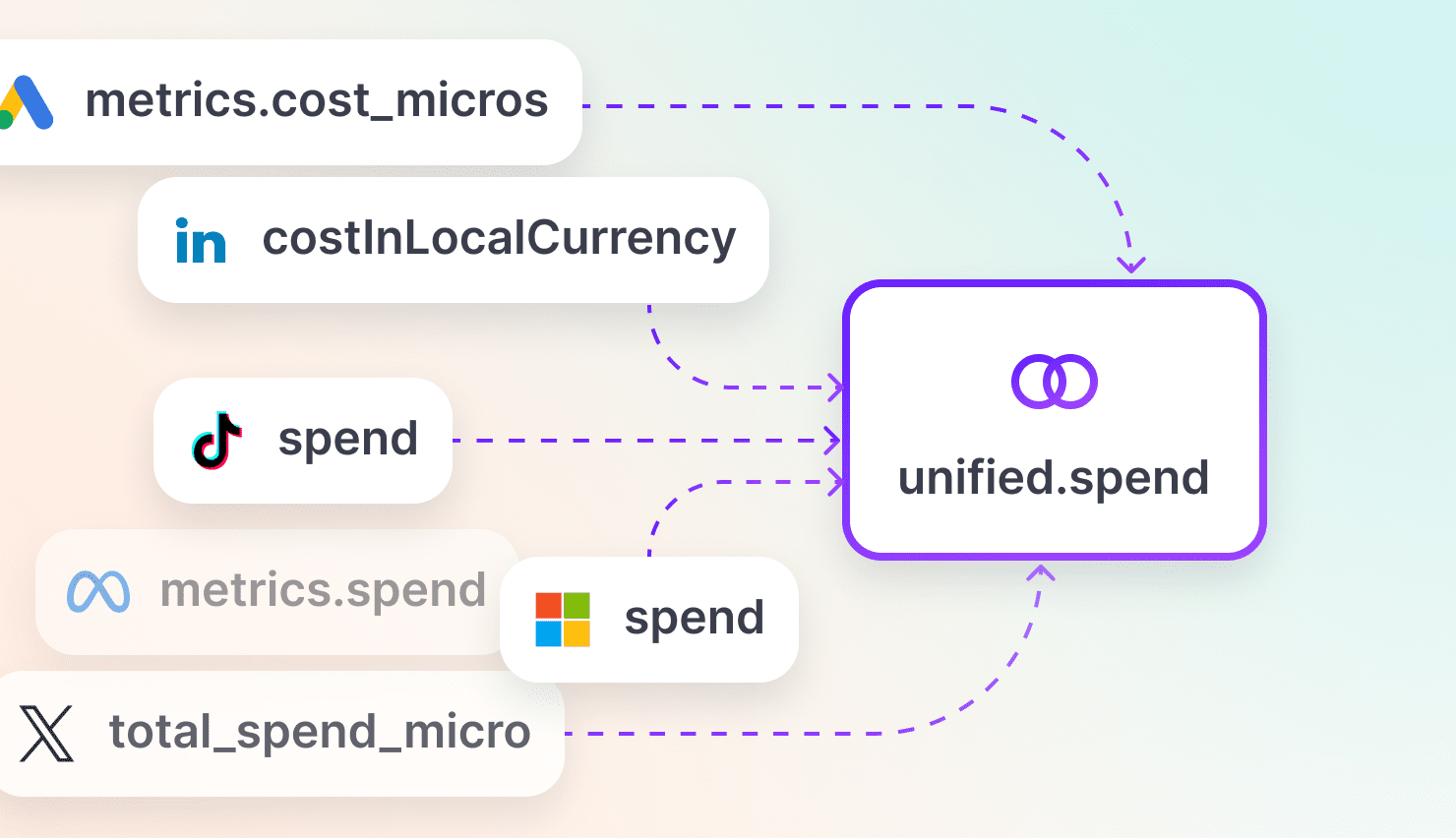
Google Ads reports cost in micros. Meta reports spend as a decimal. Each account has its own currency and reporting time zone, and each platform counts conversions under its own attribution rules. The first dashboard handles this implicitly. The second dashboard, built by someone else, handles it differently. We covered this problem in depth in You don't need a more expensive LLM. You need a data model.
Prompt · Metric definitions · From Level 3
List every metric my dashboard shows and, for each, write its definition as a table: source fields per platform, unit conversion (for example Google Ads cost_micros divided by 1,000,000), currency handling, reporting time zone, attribution window or model, and aggregation (sum, average, max, count distinct).

Then check:
- Where would a rate metric such as CTR or ROAS be summed instead of recalculated from its parts?
- Where would a platform that doesn't report a metric be counted as zero instead of excluded, dragging down a blended average?
- Where would "last 30 days" mean a different 30 days for accounts in different time zones?
- Where are conversions from two platforms added together despite different attribution rules?
- Where does more than one source report the same metric (revenue in GA4, Shopify and the CRM, say)? Pick one official source for each metric, label it on every chart, and never mix sources inside one ratio such as ROAS.
- If a second person builds another dashboard next month, how will they reuse these definitions instead of rewriting them? Propose one place where definitions live and every chart reads from.

Then design the governance around that place: who is allowed to create or change a definition, how a change is reviewed before it affects live reports, how each definition is described to the people reading the numbers (a tooltip or data dictionary), and how a change is recorded with a date and reason, so a step change in a trend can be explained later.
How we solved it
The Data Model defines each field once, with its aggregation attached to the field rather than the chart. Platform and unified fields are maintained by us and can't be edited; a platform that doesn't report a metric contributes nothing rather than a zero. Custom fields carry a name, a description that doubles as the tooltip readers see (and that AI tools read too), a formula, an aggregation and a format. Jepto validates them before saving, and an edit reaches every card, chat answer and MCP query that uses it.
Mistake 3: The numbers came back fast but nobody can say if they're right
Getting data into a dashboard isn't one pipe. Ad platforms have APIs, but plenty of what matters lives elsewhere: a Google Sheet of offline sales, a CRM export of qualified leads, a finance system, a BigQuery table someone else maintains. Each has its own columns, its own keys and its own refresh rhythm, and joining any of them to ad data depends on matching keys like campaign IDs, UTM parameters and dates in the same time zone. Someone renames a column in the sheet and the join quietly breaks.
Then every question has to become a query, and this is where AI changes the risk more than it seems. A model writes SQL in seconds, and a query on screen looks like proof. It isn't. Most of the people who need to trust the number can't read SQL, and the ones who can still have to trace every join, filter and grain to check it. Ask a second model the same question and you'll often get different SQL, sometimes a different number, and no quick way to tell which one is right or why. We get answers faster than ever, and we're less sure they're correct.
The fix is to separate what is being asked from how it's computed. Write the request in a short, structured form that names the metrics, how they roll up, the breakdown, the period and the filters. That's something a marketer can read and two models can be compared on. The joins, units and grain then live in one tested place, instead of being reinvented inside every query.
Prompt · Query verification and other sources · From Level 1
Help me make every number in my dashboard verifiable by someone who can't read SQL.

1. Request first: for each chart, write the request as a short structured spec before any SQL: metrics and how each aggregates, dimensions, filters, date range and time zone, which date each metric is counted against (click date or conversion date, order date or invoice date), comparison period, and sources. Show this spec next to the chart.
2. Then the SQL: generate the query from the spec, and list anything in the SQL that the spec doesn't state (joins, deduplication, grain, unit conversion). Each of those belongs in a shared, tested layer, not in individual queries.
3. Two-model check: I will ask another model the same question. Compare the two specs field by field and tell me exactly where they differ and which one matches what I asked. Only compare SQL if the specs match but the numbers don't.
4. Ground truth: for three known accounts and date ranges, check results against each ad platform's own interface and record the tolerance we accept.
5. Spreadsheets, CSVs, CRMs and databases: for each one, define the expected columns and types, the key that joins it to ad data, how bad rows are rejected and reported, how often it refreshes, and what happens when someone renames or adds a column.
6. Grain: flag any join that could multiply rows (one campaign to many CRM deals, one day to many sessions) and show how we prevent double counting.
7. Receipts: print a short receipt on every chart and exported image (source, fields, date range, time zone, filters, refresh time and owner), so a forwarded screenshot can be checked in a minute without rebuilding the query.
Same question, two models
"Cost per lead by campaign last month, Google Ads and Meta"
Two assistants answered with two different numbers. As SQL, each answer ran to dozens of lines. As data queries, the difference is one line.
Both requests are valid. Only one is what was asked: "last month" means the previous calendar month, not the last 30 days. Anyone can spot that in a five-second read, and once the two requests match, the two numbers match too.
How we solved it
Every chart and table in Jepto stores its request as a data query in the open Cube format, shown in the Query tab beside the preview. It names what to measure, how it rolls up, what to break it down by, which period and which filters. There are no joins or unit conversions in it, because those live once in the Data Model. Identical queries always return identical numbers, whether they come from a report, Data Chat, Claude or your own app, so a disagreement becomes a diff of two short requests. Google Sheets, BigQuery and Xero connect as data sources and go through the same Data Model, so CRM revenue and Google Ads spend are queried, and checked, the same way.
Mistake 4: Changing one ID in the URL shows another brand's data
Broken access control has held the top spot in the OWASP Top 10 since 2021, and kept it in the 2025 edition. In reporting tools it's usually simple: the account ID is in the URL or the API call, and nothing on the server checks that the viewer is allowed to see it. Permissions get finer than brand-level quickly, too. A regional manager should see their own locations, a contractor one campaign, a finance lead revenue but not the ad accounts. Then someone changes role or leaves, and every one of those rules has to change with them. Share links add a final risk, because a link that can't be revoked works forever.
Prompt · Access and secrets · From Level 2
Act as a penetration tester reviewing my dashboard. Assume several brands' data live in the same system and that some viewers are outside my company.

1. Tenant isolation: for every endpoint and query, show where the server (not the browser) checks that the current user may see this account. Write tests that try to read another account's data by changing IDs in URLs, request bodies and filters.
2. Roles and row-level permissions: propose a roles matrix (who can view, edit, share, manage users), and show how to limit a user to specific accounts, locations or campaigns inside one brand, enforced in the query layer rather than by hiding charts.
3. Joiners, movers and leavers: what happens to access, owned reports and scheduled emails when someone changes role or leaves.
4. Authentication: how users sign in, single sign-on, multi-factor, and session expiry.
5. Sensitive data: which fields could identify a person (GA4 user data, CRM imports, form leads), how they are minimised, encrypted and retained, and which privacy obligations apply where my viewers and their customers are.
6. Secrets: where platform OAuth tokens, refresh tokens and API keys are stored, whether they are encrypted at rest, and confirm none are ever sent to the browser, written to logs, or placed in an AI model's context.
7. Share links for people without accounts: token length and randomness, expiry, revoking one link without breaking others, restricting a link to named people, and rate limiting on any access-code entry.
8. Audit: can I tell who viewed, exported or shared which report, and who changed which permission, and when?

Rank the findings by severity and show the fix for the top three.
How we solved it
Account users and roles are built in, and each report is shared as Hidden, Restricted (named people request an emailed code that grants an hour of access) or Public. Platform credentials stay server-side in Jepto and never appear in AI tool results or model context, and MCP sign-in uses OAuth with PKCE, 60-minute access tokens and rotating refresh tokens. Every MCP call is scoped to the same boundaries as the web app.
Mistake 5: The report went out twice, or not at all
Idempotency comes back at delivery time. A scheduler that retries after a timeout can send the same report twice, while a PDF render that runs out of memory can fail without anyone noticing. Email from your own domain needs SPF, DKIM and DMARC: Gmail and Yahoo started enforcing them for bulk senders in February 2024, and Microsoft followed for Outlook.com from May 2025. Reports served from your own domain need a certificate for every hostname.
Prompt · Branding and delivery · From Level 4
I want my dashboard reports served from each brand's own subdomain and emailed on a schedule from their own address, with an optional PDF attached. Design this with me and cover:

1. Custom domains: how a brand points a subdomain at us, how TLS certificates are issued and renewed per hostname, how we verify DNS, and what the user sees when their DNS is wrong.
2. Email authentication: the SPF, DKIM and DMARC records needed per sending domain, alignment with the From address, and bounce and complaint handling.
3. Scheduling: time zones (whose "first business day of the month"?), and idempotency, so a retry after a timeout never sends the same report twice. Show the dedupe key.
4. PDF rendering: how we render charts to PDF, memory and concurrency limits for the headless browser, timeouts, and what happens when a render fails.
5. Monitoring: how we know a scheduled report failed before the recipient asks where it is.

Estimate the build and monthly maintenance effort for each part.
How we solved it
Branding (Starter and above) gives you one CNAME for the report URL and a set of DKIM records for the sender, with a Verify Setup button that checks each one. Email schedules handle recipients, subject, test sends and an optional PDF attachment, and the email links back to the same share URL so access rules still apply.
Mistake 6: The chart answers a different question than the one you asked
AI picks chart types the way a template does: a donut for anything with categories, a dual-axis line when two metrics won't fit on one scale. The result looks finished and quietly misleads. A donut with eleven campaigns can't be compared by eye, a dual axis invites readers to see a correlation the scales created, and a number tile with no comparison says nothing about whether it's good. After the type come currency and locale formats, comparison periods, empty states, mobile layouts, export, and accessibility, which tends to get skipped until a procurement team asks for an accessibility statement.
Prompt · Charts · From Level 2
For every chart in my dashboard, write down the one question it answers for the person reading it (for example "is cost per lead trending up?" or "which campaign spent the most?"). Then:

1. Chart type: say whether the current type is the best fit for that question, and why. Use lines for trends over time, bars for comparing categories, scatter for relationships, a number with a comparison for single KPIs, and tables when people need exact values. Flag pie or donut charts with more than a few slices, dual axes, truncated y-axes and stacked charts that hide the series people care about.
2. Context: does each chart show a comparison (previous period, previous year, target) so the reader can tell good from bad? How are partial periods and missing days handled?
3. Formatting: currency per account, locale-aware separators, percentages versus percentage points, consistent decimals.
4. Empty and error states: what a chart shows when a source has no data, is still syncing, or failed.
5. Accessibility: keyboard navigation, screen reader descriptions, colour contrast against WCAG 2.2 AA, and never relying on colour alone.
6. Export: PNG, SVG and CSV, respecting the same filters and permissions.

Show me the smallest set of changes that fixes the biggest gaps.
How we solved it
Report cards come in line, area, column, bar, donut, scatter and number charts, plus tables, each built from a data query with comparisons built in. Charts are drawn with Highcharts, used by 80 of the world's 100 largest companies, with its accessibility module included. When the form controls aren't enough, every chart and table card has a Custom tab that accepts Highcharts options as JSON, so the visual decisions stay entirely yours.
Mistake 7: The licence you didn't read
Licensing rarely comes up while you build, because everything installs for free. It comes up later, when the dashboard is shown to people outside your company. Commercial chart libraries license by use: Highcharts, for example, is free for non-commercial use, needs a SaaS licence once charts reach external viewers, and needs a custom-quoted OEM licence if your product lets others build their own dashboards. Open-source dependencies carry obligations of their own, and ad platforms attach terms to their APIs about access levels, how data may be stored, and how long.
Prompt · Licensing · From Level 2
Audit the licensing of my dashboard before it is shown to people outside my company.

1. Chart and UI libraries: the licence for each, whether my use is covered (internal only, shown to external viewers, or letting other people build their own dashboards), and the cost if it isn't.
2. Open-source dependencies: list every dependency's licence and flag any copyleft licences (GPL, AGPL) that would create obligations for a hosted or distributed product.
3. Fonts, icons and images: confirm each is licensed for web and commercial use.
4. Ad platform and analytics APIs: for each platform I pull from, the developer access level or app review I need, rate and quota tiers, and the terms on storing, caching, combining and displaying their data.
5. AI providers: whether data I send to a model is retained or used for training under my plan, and whether that's acceptable for the brands whose data it is.

Give me a table of what's compliant, what isn't, and what to do about it.
How we solved it
The Highcharts licence for every chart we render is ours, not yours. So are the platform API approvals, developer tokens and app reviews behind each connector, which we keep in good standing as terms change. If you build your own front end on Jepto's data query, you still choose and license your own chart library.
Mistake 8: Nobody knows who changed what, or how to undo it
AI-built dashboards are often edited in place: a prompt, a regenerated file, straight to the live link. That's fine for one person. Once others rely on the numbers, a change that breaks a calculation reaches everyone at once, and there's no record of what changed, who changed it, or what it looked like before. The same applies to the ad accounts underneath: when spend jumps, the first question is usually "did someone change the campaign?"
Prompt · Change control · From Level 3
Set up change control for my dashboard so more than one person can work on it safely.

1. Version control: put the code, metric definitions and report layouts in version control with meaningful commit messages, including the prompts or reasons behind AI-generated changes.
2. Environments: a test environment with sample data, and a way to preview a change against real numbers before it goes live.
3. Tests on the numbers: for a few known accounts and dates, assert that key metrics match the ad platform's own interface within a tolerance, and run them on every change.
4. Rollback: how to return to the previous version in minutes if a release breaks a calculation.
5. Change log for users: record changes to definitions, reports, permissions and schedules with who, when and why, and show readers when a definition they rely on changed.
6. Platform changes: pull the ad platforms' own change history (bids, budgets, status changes) so a sudden movement in the numbers can be matched to a change in the account.
7. Copies: find charts and queries that were copied from another and still carry an old calculation inline. Replace each with a reference to the shared definition, so a change reaches every copy.
How we solved it
Our own releases are reviewed and tested before they ship, and listed in the public changelog. Report masters push a structural change to every linked report at once, while each linked report keeps its own titles and commentary, marked as overridden so you can see where it differs. Change history automations watch Google Ads, GA4 and Business Profile accounts for activity and raise an insight you can route to a webhook.
Mistake 9: Your AI answer disagrees with your dashboard
People increasingly want to ask "why did cost per lead jump last week?" in Claude or ChatGPT instead of opening a dashboard. The quick ways to make that work all compute the answer somewhere other than the dashboard. Connect each ad platform's own MCP server and the model reconciles raw rows from five platforms inside the conversation. Give it read access to your database and it writes fresh SQL for every question, skipping the definitions your dashboard uses and bringing back the verification problem from mistake 3. Paste in a CSV export and it's working from a copy that's already out of date. Each one gives a plausible answer, and none of them is guaranteed to match the chart.
The answer in chat should come from the same place as the number on the chart: the same field definitions, the same query format and the same engine. Then the model isn't calculating anything. It's choosing a request, and you can read the request it chose. A permission written into a prompt ("only show Brand A") is also only a suggestion, because the model can reason its way around it, so access has to be enforced by that same engine.
One query, every door
The chat answer and the chart run the same request
The model's job is to choose the request. The calculation, and the permission check, happen in the same place for every door.
Prompt · AI access · From Level 5
I want people to query my dashboard's data from Claude or ChatGPT through an MCP server. Design it with me:

1. One query layer: the MCP tools must call the same query layer my dashboard uses, with the same structured request format (not free-form SQL), the same field names and the same definitions. Each answer should return the request it ran alongside the rows, so I can check it or paste it into a chart.
2. Discovery: a schema tool that lists every metric and dimension with its description, including custom metrics, so the model picks a defined field instead of inventing its own calculation.
3. Consistency test: ask the same question in chat and in the dashboard, and assert that both the request and the numbers are identical.
4. Authentication: OAuth with PKCE, token lifetimes, refresh token rotation, and what happens when access is revoked.
5. Authorisation: enforce account scoping in the query layer on the server, never in the prompt. Write a test where the model is instructed to read another brand's data and must fail.
6. Writes: any tool that changes something (a budget, a campaign status) must show a preview and require explicit confirmation, with an expiry on pending actions.
7. Cost and safety: cap result sizes so large raw tables never flood the model's context, and do aggregation in the query layer rather than in the conversation.
8. Credentials: confirm platform tokens never appear in tool results or model context.
9. Exploratory versus official: label any number produced in chat as exploratory until its headline figure has been reconciled against the official report for the same period and filters.
10. Query log: log every request the model ran, with the user, time and result size, so a wrong number that reaches a decision can be traced in minutes.
How we solved it
The Jepto MCP server has no logic of its own. Its schema tool returns the Data Model itself, including your custom fields and their descriptions, so the model picks a defined field instead of inventing a calculation. Its query tool takes the same data query a report card stores and runs it through the same engine, so the request Claude sends is one you could paste into a card's Query tab, and identical requests return identical numbers. Source skills tell the model what each platform can't report, so it says so instead of guessing. It signs in with OAuth, scopes every call to your account, and previews any change for confirmation before it runs. Our full reporting offering is available through it, so once a brand and its data sources are set up in Jepto, you can build, edit and share reports from a prompt without opening Jepto at all. It's included on every plan.
Mistake 10: It broke, and nobody noticed for a week
The quietest failures are the expensive ones: a sync that stops, a tracking tag that disappears, a dependency that reaches end of life. Auth0's older Rules and Hooks, for example, reach end of life in November 2026, so anyone who built login logic on them has a migration this quarter. And a custom app can hold thousands of lines of code and dozens of decisions made across AI conversations that nobody wrote down.
Prompt · Operations and handover · Every level
Help me make my dashboard maintainable by someone other than me.

1. Freshness: for each source, how we detect that data is stale or a sync silently stopped, and who gets alerted.
2. Data quality: checks that catch sudden drops to zero, duplicated days, or a metric that changes meaning after a platform update.
3. Dependencies: list every library, API version and third-party service we rely on, with known end-of-life or sunset dates, and set reminders.
4. Runbook: a one-page document covering how to deploy, how to rotate secrets, how to reconnect a revoked account, and how to re-run a failed day safely.
5. Decisions log: summarise the architectural decisions we made in this conversation and why, so the next person doesn't have to rediscover them.
6. Effort: estimate the hours per month this will take to keep running.
How we solved it
Connection errors email the person who connected the source, and Anomaly Detection flags unusual movement across every account, which is often how a removed tracking tag gets caught. API migrations, dependency upgrades and the on-call rota are ours to run, not yours.
Red-team the whole thing
Once you have a working version, use one last prompt to have the model attack its own work. Paste in your architecture notes or code alongside it.
Prompt · Final review · Any level
You are reviewing a marketing reporting dashboard before it is used by people outside the team that built it. Be adversarial. Find the ways it will produce wrong numbers, leak data, fail silently, or become unmaintainable.

Check specifically: whether every number has a readable request spec that a non-engineer could verify, how spreadsheets, CSVs and CRM data are validated and joined, idempotency of syncs and scheduled sends, rate limits and retries, pagination, late and restated data, token expiry and revocation, tenant isolation on every endpoint, roles and row-level permissions, joiners and leavers, sensitive data handling, secrets, share link revocation, metric definitions, aggregation and governance, the date each metric is counted against, one official source per metric, receipts on charts and screenshots, copied queries carrying old definitions, time zones and currencies, chart type choices, email authentication, PDF rendering limits, accessibility, licensing of libraries, fonts and platform APIs, version control, testing and rollback, change and audit logs, AI access scoping, labelling and logging of AI-produced numbers, monitoring and alerting, API version sunsets, and documentation for handover.

For each finding give: severity, how a user would notice it, the fix, and the effort to fix. Finish with the maturity level this dashboard is genuinely ready for today, and what it would take to reach the next one.
Or keep your dashboard, and skip the data layer
If you've worked through those prompts honestly, you'll have noticed where the weight sits. Mistakes 1 to 3 are about getting the data right, and they're the ones that take months and never really finish. Our earlier article used Amazon's phrase undifferentiated heavy lifting for this kind of work: it has to be done well, but it makes no agency's reporting better than another's. Nobody chooses an agency because its sync job handles pagination.
So you don't have to choose between building everything and building nothing. The most useful split is between the two layers: let someone else run the data layer, and keep building the dashboard you want on top of it. Use our reporting too if it saves you the second layer; skip it if you'd rather keep your own. Either way, the parts that carry your expertise stay yours, in open formats.
Where the line sits
Undifferentiated on the left. Your IP on the right.
Jepto carries
The data layer, and the reporting layer if you want it.
Platform API approvals, developer tokens and terms
Connectors, syncs, token refresh and API version migrations
Storage, schema changes and backfills
Unified fields, units, currencies and time zones
The query layer and the MCP server
Optional logins, share links, branding, schedules and charts
You own
The decisions that make your reporting yours.
What each metric means custom fields
The questions every card asks Cube-format queries
How each chart looks, down to the axis Highcharts JSON
Your themes, palettes and templates
The analysis and the recommendations
Anything you build on top, through MCP
Your own dashboard, on our data layer
Every chart and table in Jepto is a saved data query: a short JSON request naming measures, dimensions, a time range and filters. We didn't invent the format. It follows the conventions of Cube, the open-source semantic layer that has been public since 2019 and is Apache 2.0 licensed at its core. AI assistants have seen it for years, so they write valid queries with little prompting. The same query can be sent from your own app or agent over MCP, and it comes back as rows keyed by the same field names, already normalised across platforms. For most people building their own dashboard, this is the path we'd suggest: you write the experience, and skip the access applications, syncs and definitions entirely.
Spend and leads by platform, last 30 days, Brand campaigns onlySame query in a report card, Data Chat, Claude, or your own app
Measures, dimensions, timeDimensions and filters are Cube conventions. Jepto adds compact relative dates such as last30days, a previous-period comparison, per-query rollup overrides, and custom fields it calculates for you.
Charts you can take all the way
Form controls cover the common cases. When you want a target line on cost per lead or a shaded band for a sale period, every Jepto chart and table card has a Custom tab that accepts Highcharts options as JSON. You write only the keys you want to change, and Jepto merges them on top of its defaults and your form settings. Because it's standard Highcharts, the public API reference applies, and your AI can write the override from a sentence.
A target line and a caption, nothing else changedPasted into a line chart's Custom tab
{
  "yAxis": {
    "plotLines": [{
      "value": 25, "width": 2, "dashStyle": "Dash", "color": "#6E3BEA",
      "label": { "text": "Target cost per lead: $25" }
    }]
  },
  "tooltip": { "shared": true, "valuePrefix": "$", "valueDecimals": 2 },
  "caption": { "text": "Dashed line marks the agreed target for this quarter." }
}
1. Jepto defaultsBuilt-in options for the chart type, your theme and palette.
2. Form settingsEverything set on the Chart, Table and Palette tabs.
3. Your JSONApplied last, so it wins on any property it sets.
Plain JSON only (no JavaScript functions), arrays replace rather than merge, and changing chart type resets the overrides. The data always comes from the card's query; Custom changes how it's drawn, never what it says.
What each approach costs
Your AI will give you its own effort estimates from the prompts above, and for your situation you should trust those over ours. Before you do, one thing that trips up almost everyone who budgets a self-built dashboard.
Where the money actually goes
The code cost US$20. The person costs the rest.
Tools and hosting
An AI coding subscription is about US$20 a month, and a small dashboard can be hosted for around US$5 a month. That's the bill most people picture, and it's genuinely tiny.
People's time
Every hour spent on sign-in flows, DNS records, failed PDFs and "why doesn't this match?" is an hour of someone's salary. It feels free because they're already on payroll. It isn't: it's time not spent on work you can bill for.
The infrastructure is rarely what makes a self-built dashboard expensive. The hours around it are, and they keep arriving every month after launch.
Here's what building it yourself actually involves, task by task, in two separate tables: the data layer first, then the reporting layer. None of these jobs is big on its own, and with an AI assistant most take an afternoon or less. There are just a lot of them, and the maintenance lists never finish. Untick any area you don't need, and put in your own rate at the bottom.
The data layer · build it yourself
48 tasks before anyone sees a chart
Getting trustworthy numbers in, and keeping them right. Typical hours for a capable developer working with an AI coding assistant. Untick any area you don't need.
One-time build
Hours
22 h
Google Ads developer token application and access review
4 h
Meta app review and business verification
6 h
LinkedIn Marketing API access application
3 h
Microsoft Advertising and TikTok developer accounts
3 h
Google Cloud project and OAuth consent verification (GA4, Search Console)
4 h
Business Profile API access request
2 h
80 h
Google Ads: OAuth, report queries, field mapping
14 h
Meta Ads: OAuth, insights jobs, breakdowns
14 h
GA4: OAuth, reports, sampling and quotas
10 h
LinkedIn Ads
10 h
Microsoft Ads
10 h
TikTok Ads
8 h
Google Business Profile
8 h
Search Console
6 h
42 h
Scheduler for daily and intraday syncs
4 h
Idempotent upserts keyed by account, date and entity
6 h
Rate limits, backoff and quota tracking per platform
8 h
Pagination and chunking for large accounts
4 h
Trailing re-sync window for restated conversions
4 h
Historical backfill without exhausting quotas
6 h
Token refresh, revoked access and reconnect emails
6 h
Sync status and partial-data flags
4 h
25 h
Database or warehouse schema per platform
8 h
Partitioning and query performance
6 h
Schema drift: new, removed and retyped fields
8 h
Retention, and deleting data when a source disconnects
3 h
26 h
Google Sheets and CSV imports with validation
8 h
BigQuery and database connections
8 h
CRM and offline conversion joins
10 h
51 h
Units (cost micros), currencies and exchange rates
6 h
Account time zones and date alignment
4 h
Unified fields mapped across every ad platform
16 h
Aggregation rules per metric (sum, average, max)
4 h
Missing, not zero, for platforms without a metric
3 h
Custom metrics with formulas and validation
10 h
Metric dictionary and descriptions
4 h
Definition change review and history
4 h
50 h
Query API: measures, dimensions, filters, date ranges
12 h
Period comparisons and relative dates
4 h
Caching with consistent results
6 h
Account scoping enforced on every query
4 h
MCP server with OAuth for Claude and ChatGPT
10 h
Readable query spec shown beside every chart
6 h
Tests that compare key numbers with each platform's UI
8 h
16 h
Architecture and scoping
4 h
Security review: tokens, secrets, isolation
4 h
Data freshness and drop-to-zero alerts
4 h
Documentation and runbook
4 h
Build
312 h
Maintenance, every month
Hours
API version migrations (Google Ads alone ships four major versions a year)
4 h
Platform changes: retired metrics, attribution windows, new fields
3 h
Failed syncs, expired tokens and reconnects
3 h
Quota and rate-limit issues as accounts grow
1 h
Investigating "why doesn't this match the platform?"
3 h
Security patches and dependency updates
2 h
Maintenance
16 h a month
The reporting layer · optional
25 more tasks to put those numbers in front of people
Logins, charts, sharing and delivery. Skip this table entirely if you use our reporting, or keep your own front end on top of the data layer.
One-time build
Hours
17 h
Auth provider and login page
3 h
Invite and remove users
3 h
Multi-factor and single sign-on
3 h
Roles and row-level access
5 h
Admin screen for users
3 h
7 h
Tokens with hidden, restricted and public modes
3 h
Emailed access codes
3 h
Expiry and revoking a link
1 h
21 h
Chart components
5 h
Sortable tables with totals
3 h
Formatting and comparisons
3 h
Filters and date picker
3 h
Themes and mobile layout
3 h
Export
1 h
Accessibility
3 h
11 h
Custom domains and TLS
4 h
DNS verification
2 h
Email sending with DKIM
3 h
Branded email templates
2 h
11 h
Schedule builder
3 h
Queue, retries and no double sends
3 h
PDF rendering
4 h
Failure alerts
1 h
5 h
Version control and deploys
3 h
Test environment
2 h
Build
72 h
Maintenance, every month
Hours
Dependency and provider updates
1 h
Adding brands, users and DNS records
1 h
Small change requests
2 h
Maintenance
4 h a month
Year one · all figures in US dollars
What both layers cost together
Data layer, year one
–
Build plus maintenance
Reporting, year one
–
Build plus maintenance
AI tools and hosting
–
Twelve months
Year one, typical
–
–
– data layer– reporting– tools and hosting
Defaults: US$95 an hour is the US median software developer wage (US$135,980, BLS, May 2025) plus benefits, which make up 30% of private-sector compensation (BLS, June 2026). Hosting assumes a small database; storage, an auth plan, email sending or a commercial chart licence cost extra once you outgrow free tiers. Connector hours assume API access is approved; approval itself can take longer than the build. Any single task can run over or under; across 73 of them those tend to even out, so we show the total within about 15% either way. Our estimates, not a quote.
Built in full, that's 384 hours across 73 small tasks, and 312 of those hours are the data layer. A typical first year comes to about US$60,000, and about 80% of it is the data layer, which also carries 16 of the 20 monthly maintenance hours, because ad platforms never stop changing. The reporting layer on its own is about US$11,400 a year. The dashboard is the small part. And almost none of the total is tools or hosting: it's people's time.
For comparison, here is our pricing as listed on jepto.com/pricing, in US dollars. Plans are priced by data sources, because the data layer is the hard part we run for you. Every plan has a 14-day free trial, and yearly billing saves roughly two months.
Jepto pricing · US dollars
Plans are priced by data sources
Plan
Monthly
Per month, paid yearly
Data sources
AI credits
Custom branding
Basic
US$10
US$8
1
100
Jepto brand only
Starter
US$99
US$79
25
1,000
Included
Plus
US$299
US$239
100
3,000
Included
Pro
US$499
US$399
200
5,000
Included
Add-ons
US$10 a month per limit pack (+10 data sources, plus KPIs, budgets, anomalies and automations). Extra AI credits are US$10 per 1,000 a month. Data Warehouse credits for BigQuery are optional, at US$1 per credit a month.
Included on every plan
The Data Model and the Jepto MCP server, with no usage limits, so you can keep your own dashboard on top. Custom branding for our reporting starts on Starter.
What a plan doesn't remove: deciding what your metrics mean, reviewing what AI drafts before it goes out, and the judgement in the analysis. That part is yours either way.
When building it all yourself is the right call
You're staying at Level 1 or 2. A personal dashboard, or one shared with a few colleagues, rarely needs DKIM records or PDF queues. Run the first four prompts and enjoy it.
The dashboard is the product. If reporting is what you sell, the presentation layer is your differentiation and belongs in your codebase.
You need write-back or workflows tied to your own systems. Approvals, planning and data entry are application territory. BI vendors see it too: Microsoft previewed Fabric Apps at Build 2026 so custom data apps can run inside its governed platform.
You already run a data platform. If your team maintains connectors, a warehouse and API migrations for another product, the marginal cost of the data layer is far lower than the table suggests.
Spend your hours on what's yours
AI has made the first version of a dashboard fast and cheap, and that's good news. The prompts above are how you make the rest of it safe, whether you build every layer yourself or not. If you take one thing from the cost table, make it this: the dashboard was never the expensive part. The data underneath it is. Whichever way you go, the parts worth your time are the same: the definitions you'll defend in a meeting, the questions each chart asks, how each one looks, and the analysis on top.
Build what sets you apart. Rent the rest.
References
OWASP Top 10, 2025 edition: Broken Access Control remains A01. owasp.org/Top10
Microsoft, new requirements for high-volume senders to Outlook.com, from 5 May 2025. Microsoft Tech Community
Auth0 deprecations: Rules and Hooks end of life, November 2026. auth0.com/docs