Analytics
Dale McGeorge
Head of Product


We gave 11 AI models a real business's Google Ads, GA4 and Search Console data and asked the questions you'd ask in a monthly report. On the textbook questions they were almost perfect. On the questions that need a decision, they gave different answers that all looked right. Then we ran the same questions through a data model.
A thread on r/analytics recently asked what AI is and isn't replacing in analytics work. The most upvoted reply wasn't about jobs. It asked who catches the incorrect join, the flawed aggregation or the result that's silently wrong when nobody reads the code. The hard part isn't writing the query anymore. It's knowing whether you can trust the number that comes back.
We wanted to measure that on real marketing data, not a toy example. So we took one month of a real business's Google Ads, GA4 and Search Console data, gave it to 11 AI models as a warehouse they could query, and asked the questions you'd find in any monthly report, from ROAS to "how many leads did we get?". Every model could explore the tables, run as many queries as it liked and check its own work before answering. Then we asked the same questions through Jepto's data model instead of raw tables.
The short version: today's models are very good at the questions with one right answer. Where a question needs a decision, like how to split ad spend across landing pages, they make different decisions, and nothing in the output tells you which one you got.
We'll call the business Homer's Donuts, a donut shop in Springfield that sells online, runs five Google Ads campaigns and tracks its site with GA4 and Search Console. The name is ours; every number below is real data from a real business's account. We used September 2026: $2,481 of Google Ads spend, 2,112 website sessions and $13,676 of revenue.
Each model worked as an agent, the way most people use AI with data today. We used the same lightweight agent loop for every model (built with Strands Agents) and changed only the model, so differences come from the model rather than the setup. Each run got one question and up to 15 tool calls, and had to finish with an answer table plus every query it used.
There were two setups.
SQL on a warehouse. The data sat in a warehouse in the shape most connectors produce: daily Google Ads campaign rows, GA4 rows by day, source, medium, campaign, landing page and device, a monthly GA4 property table, and Search Console daily totals plus a query and page table. The model saw the schema and had one tool, run_sql.
Jepto's data model through MCP. The model had Jepto's MCP tools for the same account: the data source list, the metric and dimension catalogue, and the analytics query tool. No SQL, no tables, just named metrics such as googleAds.roas and googleAnalytics4.totalUsers.
Here's the prompt every model got, word for word apart from the name and currency.
You are a marketing analyst. Today's date is 2026-10-01. Homer's Donuts is an American donut
shop in Springfield. Amounts are in USD. Use your tools to answer the question from the data. You have read access
to the company's DuckDB data warehouse through the run_sql tool.

Schema: (the eight tables, with the column notes a connector's documentation gives you)

When you're done, reply with the answer as a JSON table in a ```json block shaped like
{"columns": [...], "rows": [[...], ...]}, followed by every SQL query you used for that
answer, each in its own ```sql block.
The Jepto version swaps the warehouse sentence for "You have the Jepto MCP tools for the company's marketing data" and asks for the analytics_query calls instead of SQL. The question then follows, with the shape of the answer so results are comparable:
Question: Which landing pages got the best return on our Google Ads spend in September?

Return one row per landing page with columns named landing_page, spend, revenue and roas.
We ran every question three times per model and checked each answer against the platforms' own figures: Google Ads for spend, clicks, conversions and value, GA4 for sessions, users and revenue, and Search Console for clicks, impressions and position.
The experiment
Same questions, same data, every answer checked against the platforms
The models: Claude Opus, Sonnet and Haiku, GPT-5.5, Gemini 3.1 Pro and 3.8 Flash, Grok 4.7, Kimi K3, GLM 5.3, DeepSeek V4.1 Flash and Qwen 3.8 Max, all at their default settings.
Scorecard
Correct answers out of three runs, by model and question
| Model | ROAS | Users | Organic CTR | Conv. | Campaigns | Channel users | Avg CTR | Landing pages | Aug vs Sep |
|---|---|---|---|---|---|---|---|---|---|
| Claude OpusOpus | 3/3 | 3/3 | 3/3 | 2/3 | 3/3 | 0/3 | 3/3 | 0/3 | 3/3 |
| Claude SonnetSonnet | 3/3 | 3/3 | 3/3 | 3/3 | 3/3 | 0/3 | 3/3 | 0/3 | 3/3 |
| Claude HaikuHaiku | 3/3 | 3/3 | 3/3 | 3/3 | 3/3 | 0/3 | 3/3 | 0/3 | 3/3 |
| GPT-5.5GPT-5.5 | 3/3 | 3/3 | 3/3 | 3/3 | 3/3 | 0/3 | 3/3 | 0/3 | 3/3 |
| Gemini 3.1 ProGem Pro | 3/3 | 3/3 | 3/3 | 3/3 | 3/3 | 0/3 | 3/3 | 0/3 | 3/3 |
| Gemini 3.8 FlashGem Flash | 3/3 | 3/3 | 3/3 | 3/3 | 3/3 | 0/3 | 3/3 | 0/3 | 3/3 |
| Grok 4.7Grok | 3/3 | 3/3 | 3/3 | 3/3 | 3/3 | 0/3 | 3/3 | 0/3 | 3/3 |
| Kimi K3Kimi | 3/3 | 3/3 | 3/3 | 3/3 | 3/3 | 0/3 | 3/3 | 0/3 | 3/3 |
| GLM 5.3GLM | 3/3 | 3/3 | 1/3 | 3/3 | 3/3 | 0/3 | 2/3 | 0/3 | 3/3 |
| DeepSeek V4.1 FlashDeepSeek | 3/3 | 3/3 | 3/3 | 3/3 | 3/3 | 0/3 | 3/3 | 0/3 | 3/3 |
| Qwen 3.8 MaxQwen | 3/3 | 3/3 | 3/3 | 3/3 | 3/3 | 0/3 | 3/3 | 0/3 | 3/3 |
Not shown: ROAS, Users, Campaigns, where every model got all three runs right.
Jepto data model results are provisional: they will be replaced with the real run before publishing.
When a question has one right answer and the data supports it, the models found it. Google Ads ROAS for September was 2.29, and all 33 SQL answers said so. GA4 counted 1,576 users, and all 33 answers found the monthly table and used it rather than adding up days. Spend, sessions and revenue by campaign were right in 33 of 33, and so was the month-over-month comparison, the most involved question we asked. Conversions and cost per conversion were right in 32 of 33; the other counted Search campaigns only, a defensible reading we score as a different definition.
The account's click-through rate was 2.55%, and 32 of 33 answers returned it, even though we phrased the question as "the average click-through rate of our campaigns". The one exception is worth a look: GLM 5.3 averaged the five campaigns' rates, got 8.32%, said that's what it had done, and added that the account-level figure was 2.55%. It was the only answer that noticed the question could be read two ways.
The agent setup helped. Models routinely checked the date range, looked at the currency and time zone columns, and inspected the data before writing the final query. The median answer took two or three queries; the landing page question took ten.
If you've avoided AI for marketing SQL because you expect it to fumble basic aggregation, that's no longer where the risk is.
Before the mistakes, here's every answer. Pick a question to see each distinct result the models returned and which models returned it. Click any model to see the exact SQL it wrote, compared line by line with the closest correct answer, so you can see precisely where two answers part ways.
Answer explorer
Same question, different answers, and the exact SQL behind each one
“Which landing pages got the best return on our Google Ads spend in September?”
True answer: no single true answer: spend has to be split across pages · 33 answers, 7 different results
Different definitionOne way of splitting spend across pages
Different definitionOne way of splitting spend across pages
Different definitionOne way of splitting spend across pages
Different definitionOne way of splitting spend across pages
Different definitionOne way of splitting spend across pages
WrongAllocated 1.1x the real spend
Query failedNo answer table
Search Console reports an average position for every day. For the month, the position you want weights each day by its impressions, which is how Search Console itself reports a period. 31 of 33 answers returned 12.43. Both runs that didn't came from one model, which took a plain average of the daily positions and reported 11.96.
SELECT
  SUM(clicks)::DOUBLE / SUM(impressions) AS ctr,
  AVG(position) AS avg_position
FROM gsc_site_daily
WHERE date >= DATE '2026-09-01' AND date <= DATE '2026-09-30';
That's the exact query GLM 5.3 wrote on its second run. AVG(position) counts every day the same, busy or quiet.
Half a position doesn't sound like much. But notice that the click-through rate in the same query is done properly, from totals. The model knew the rule for one ratio and not the other, and nothing in the result looks wrong.
We asked how many users each channel brought in September, and how many users there were in total. The total is easy: 1,576, in the monthly table. Users by channel aren't in the warehouse for the month, only for each day, and daily users can't be added up into a month. There's no correct way to answer the channel half of the question from these tables.
Every answer gave channel numbers anyway. 31 of 33 put the correct 1,576 in the total row and filled the channel rows by adding up daily users. Those channel rows add up to 2,016. So the table says 1,576 people visited, and also that the channels brought 2,016 of them. The other two used 2,016 as the total.
select session_medium, sum(total_users) u from ga4_daily where date>='2026-09-01' and date<'2026-10-01' group by 1 order by 2 desc;
select * from ga4_property_monthly where month='2026-09';
That's Claude Sonnet's first run, in full: one query for the channels, one for the total, and no note that they disagree. 11 of the 33 answers did warn that the channel rows were overstated. The other 22 handed over a table whose rows add up to more than its own total, without a word.
Google Ads doesn't report spend by landing page, and GA4 doesn't report spend at all. To get ROAS by landing page you have to decide how to split each campaign's spend across the pages its visitors landed on, then match that to GA4 revenue. Every model had to make that decision, and it took them a median of ten queries, more than any other question. You can see every version, and the SQL behind it, in the explorer above.
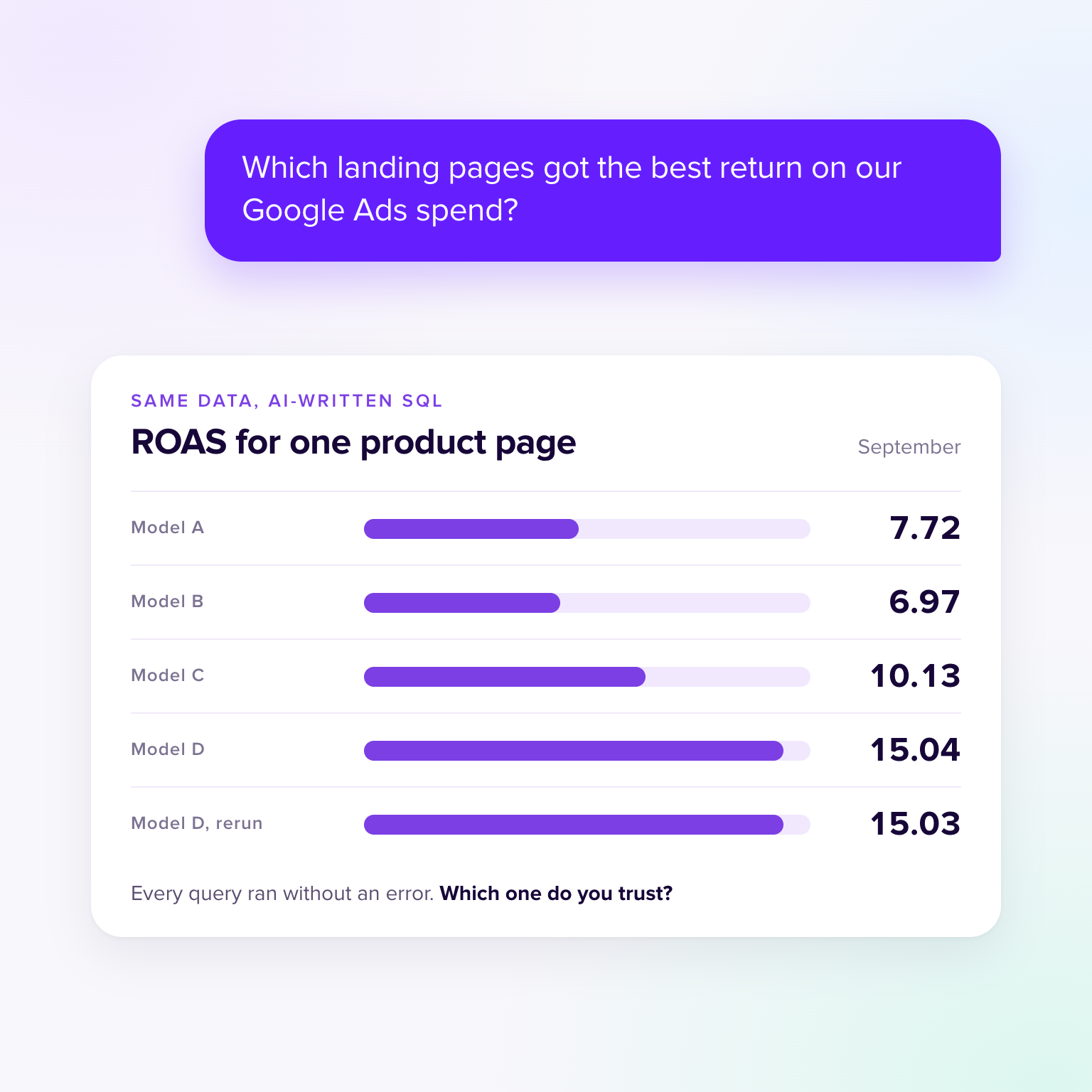
Most answers split each campaign's spend by its share of sessions on each page, and still didn't agree. Homepage spend ranged from $1,026 to $1,461 depending on which sessions were counted, which put the homepage's ROAS anywhere from 0.32 to 0.46: six different figures from 32 answers. One page's ROAS ranged from 6.97 to 15.04. Some answers listed 49 pages and others 6, and one allocated 13% more spend than the account actually spent.
None of these is a bug. Each is a defensible modelling choice, and each produces a clean, plausible table. The problem is that the choice is invisible unless you read the SQL, and the same model made different choices on different runs.
The real data contained a trap we didn't plan. Google Ads credited the campaigns with $5,686 of conversion value. GA4 recorded about $3,200 of revenue from those campaigns' sessions. The brand campaign is the extreme case: $1,486 of value in Google Ads, $0 of revenue in GA4.
Both numbers are "right". They count different things: Google Ads attributes conversions to ad clicks using its own model, often across days and devices, while GA4 credits the session. When we asked for revenue by campaign, all 33 answers used GA4, and in every one the brand campaign showed no revenue at all. None mentioned that Google Ads credits the same campaign with $1,486. Ask the question slightly differently and you get the Google Ads view, with brand as one of the best performers. Same month, same business, opposite conclusions about one campaign.
Google Ads also reports fractional conversions (14.18 for the brand campaign) because of data-driven attribution, which surprises anyone who expects whole orders.
Everything so far had a right answer we could check. Real questions usually don't. Nobody asks for "the impression-weighted average position"; they ask how many leads they got, or which campaign to cut. So we asked all 11 models nine questions like that, once each, against the same warehouse.
Business questions
Same data, same question: which definition each model chose
One run from each of the 11 models. Each bar is 11 answers, split by the definition the answer used.
“How many leads did we get in September?”
10 of 11 said which definition they used
“How much revenue did our marketing drive in September?”
11 of 11 said which definition they used
“If we had to cut one Google Ads campaign, which one should it be?”
7 of 11 said which definition they used
“Did Google Ads pay for itself in September?”
9 of 10 said which definition they used
“Which channel performed best in September?”
10 of 11 said which definition they used
“How did September go compared to August?”
6 of 11 said which definition they used
“What were our sales in September?”
10 of 11 said which definition they used
“What's our cost per lead from Google Ads in September?”
10 of 11 said which definition they used
“What's our website conversion rate for September?”
9 of 11 said which definition they used
On some, the models converged. All 11 reported sales as GA4 revenue, worked out cost per lead from Google Ads conversions, and measured conversion rate per session. Nine of 11 named organic search as the best channel. Where they converged, they mostly did so by picking the same default, not by checking it with anyone.
On the others, they split. "How many leads did we get?" got 71 from five models (every GA4 key event), 80 from one (Google Ads conversions), several figures with no headline from three, and from two an honest "we can't tell you": the warehouse has no form-fill or enquiry event, so there's no true lead count. "How much revenue did our marketing drive?" got headlines from $3,200 (paid search only) to $13,676 (every sale on the site), with $7,500, $7,800 and $9,882 in between, depending on whether organic search, AI assistants and direct visits count as marketing.
The answer that matters most for a budget meeting split 8 to 3. Asked which Google Ads campaign to cut, eight models said Glazed Donuts, whose September return collapsed on Google Ads' own figures. Three said Brand, which shows no revenue at all in GA4. Both are reasonable readings of the same data, and they recommend opposite actions.
The models weren't hiding anything: 82 of the 98 answers said which definition they used. But saying it isn't the same as being consistent. All five models that counted 71 leads then worked out cost per lead from Google Ads' 80 conversions, so their two answers use two different definitions of a lead. Ask both questions, put the answers in one report, and the numbers don't reconcile. Nobody made a mistake you could point to. The business never decided what a lead is, so each answer decided for it.
One more trap, this time in the data itself. Search Console hides searches that too few people make, for privacy. Its daily site totals include them; its query and page table doesn't. In September the site got 371 clicks from Google Search, but the query table adds up to just 112. A model that answers "how many organic clicks" from the query table is off by 70%, with no error. All 33 answers used the site table, as they should, so this one didn't catch anybody. It will catch the next question that needs a query-level breakdown.
The same models, the same questions, the same account, but no tables. Each model got Jepto's MCP tools and had to find the answer through the data model: look up the metrics, then ask for them by name. All 11 models found their way with no instructions beyond the prompt above, in a median of 3 tool calls against 3 for SQL.
Where the data model defines the answer, the guessing stopped. ROAS, click-through rate, cost per conversion and average position are defined once in Jepto and recalculated from totals, so a model asking for googleAds.roas gets 2.29 whichever way it phrases the question. 33 of 33 answers got ROAS, CTR and cost per conversion right, and 33 of 33 got the impression-weighted average position. Users come from GA4 for the whole period rather than from days, so 33 of 33 answers said 1,576, and users by channel matched GA4's own report 33 of 33 times. That's the question no SQL answer could get right from the connector tables.
The landing page question changed shape rather than difficulty. Jepto's Google Ads model has a landing page dimension, so the data model can answer from Google Ads' own spend and conversion value per landing page, with no splitting of spend and no matching to GA4. Every model that used it got the same table. It's a different definition from the GA4 revenue split, and we score it that way, but it's one definition, written down once, instead of eight improvised ones.
The revenue question is where a data model can't decide for you. Google Ads conversion value and GA4 revenue are both in Jepto, clearly named, and the models had to pick one, just as they did in SQL. Most picked Google Ads conversion value. What changed is that the choice is visible in the query: googleAds.conversionValue or googleAnalytics4.purchaseRevenue, not a column buried in a join.
And the month-over-month question took one query instead of 21 lines of SQL. More on that at the end.
Two setups compared
Share of correct answers for each question
Each mark is 33 answers: 11 models, three runs. Landing page answers are all defensible splits of spend, so none counts as correct. Hover a mark for the count.
| Question | SQL on a warehouse | Jepto data model (provisional) |
|---|---|---|
| ROAS | 33/33 | 33/33 |
| Users | 33/33 | 33/33 |
| Organic CTR and position | 31/33 | 33/33 |
| Conversions and CPA | 32/33 | 32/33 |
| Revenue by campaign | 33/33 | 33/33 |
| Users by channel | 0/33 | 32/33 |
| Average CTR | 32/33 | 33/33 |
| ROAS by landing page | 0/33 | 0/33 |
| August vs September | 33/33 | 32/33 |
Jepto marks are provisional until the real run.
On the questions with one right answer, the models agreed, and agreement meant something. On the questions that need a decision, agreement was never the point. Landing page ROAS has several defensible answers, and the models spread across them. Revenue by campaign has two true answers, and most models picked one without saying there was another. A second model, a rerun, or a majority vote can't tell you which definition you wanted.
What each case needed was a decision made before the question was asked. How is spend split across pages? Is revenue what Google Ads says or what GA4 says? How is position averaged over a month? An analyst who's been burned before carries those answers around. A model starting from a schema doesn't, so it guesses, and a guess that runs cleanly looks the same as a fact.
Checklist
Seven checks before you trust an AI-written number
One business and one month, so treat the percentages as illustrations, not benchmarks. The data is real, which means some true answers depend on a definition. Where a question had more than one defensible answer, we marked answers as "different definition" rather than wrong and show every version in the explorer. Users were checked against GA4's own monthly figures, because users can't be added up from daily rows.
Campaign names, page paths and search terms have been relabelled to fit the name; the figures and the logic of every query are unchanged. Every model ran in the same Strands agent loop with default settings, a 15-tool-call budget and the same prompt; the SQL ran in DuckDB. Claude models ran through the Anthropic API, GPT through OpenAI, Gemini through Google, Grok through xAI, and Kimi, GLM, DeepSeek and Qwen through Fireworks.
The Jepto runs used the production MCP server, the same one available to ChatGPT and Claude users, on [date].
The last item on that checklist is the one that scales. If every definition lives in someone's head, or in whichever SQL a model writes today, every new question is a fresh chance to get it wrong. That's the idea behind a semantic layer, or data model: metrics are defined once, centrally, and every query, chart and AI answer uses the same definitions instead of rebuilding them from raw tables.
We made the longer argument in You don't need a more expensive LLM. You need a data model. This experiment is the evidence for it. On the questions where the definition was the hard part, the data model removed the guess. On the questions where the business has to decide, such as which revenue to report, it made the decision visible.
In Jepto, Google Ads metrics such as ROAS, CTR, CPC and cost per conversion, Search Console position and GA4 users are defined once in the data model and calculated correctly for any date range, so a report, an AI answer and an MCP query ask for the metric rather than rebuilding it. Every card also shows the exact query behind its number in the Query tab, so checking an answer means reading a few named fields, not someone else's SQL.
Here's the difference in practice, on a question with a few more moving parts: which Google Ads campaigns improved their ROAS from August to September, with spend, conversions, cost per conversion and ROAS for each month. All 33 SQL answers got this right. The point isn't whether the answer is right. It's what you have to read to know that it is.
Here is Gemini 3.8 Flash's answer on its first run, exactly as written, next to the Jepto query for the same question.
Same question, two answers
What you have to know to trust each one
SELECT
    campaign_name AS campaign,
    SUM(CASE WHEN date >= '2026-08-01' AND date <= '2026-08-31' THEN cost END) AS aug_spend,
    SUM(CASE WHEN date >= '2026-08-01' AND date <= '2026-08-31' THEN conversions END) AS aug_conversions,
    SUM(CASE WHEN date >= '2026-08-01' AND date <= '2026-08-31' THEN cost END) /
        SUM(CASE WHEN date >= '2026-08-01' AND date <= '2026-08-31' THEN conversions END) AS aug_cost_per_conversion,
    SUM(CASE WHEN date >= '2026-08-01' AND date <= '2026-08-31' THEN conversions_value END) /
        SUM(CASE WHEN date >= '2026-08-01' AND date <= '2026-08-31' THEN cost END) AS aug_roas,
    SUM(CASE WHEN date >= '2026-09-01' AND date <= '2026-09-30' THEN cost END) AS sep_spend,
    SUM(CASE WHEN date >= '2026-09-01' AND date <= '2026-09-30' THEN conversions END) AS sep_conversions,
    SUM(CASE WHEN date >= '2026-09-01' AND date <= '2026-09-30' THEN cost END) /
        SUM(CASE WHEN date >= '2026-09-01' AND date <= '2026-09-30' THEN conversions END) AS sep_cost_per_conversion,
    SUM(CASE WHEN date >= '2026-09-01' AND date <= '2026-09-30' THEN conversions_value END) /
        SUM(CASE WHEN date >= '2026-09-01' AND date <= '2026-09-30' THEN cost END) AS sep_roas,
    (SUM(CASE WHEN date >= '2026-09-01' AND date <= '2026-09-30' THEN conversions_value END) /
        SUM(CASE WHEN date >= '2026-09-01' AND date <= '2026-09-30' THEN cost END)) >
    (SUM(CASE WHEN date >= '2026-08-01' AND date <= '2026-08-31' THEN conversions_value END) /
        SUM(CASE WHEN date >= '2026-08-01' AND date <= '2026-08-31' THEN cost END)) AS improved
FROM google_ads_campaign_daily
GROUP BY campaign_name
ORDER BY campaign;
6 things to check
improved compare September with August, not the reverse?{
"measures": [
"googleAds.spend",
"googleAds.conversions",
"googleAds.costPerConversion",
"googleAds.roas"
],
"dimensions": [
"googleAds.campaignId",
"googleAds.campaignName"
],
"startDate": "2026-09-01",
"endDate": "2026-09-30",
"compareStartDate": "2026-08-01",
"compareEndDate": "2026-08-31",
"periodTotals": true
}3 things to check
The Jepto query is provisional until the real run.
For the Jepto query, you check three things: that these are the metrics you mean, that the two date ranges are right, and that campaigns are grouped by ID. How ROAS and cost per conversion are calculated isn't something you have to check, because it's defined once in the data model and tested there.
Neither answer is automatically right. The SQL is right because its author got 16 expressions right and you can confirm that by reading all of them. The Jepto query is right because the definitions it names are right, and what's left for you to check is whether you asked for the right metrics over the right dates. That's a question about your business, not about BigQuery. It's the real answer to the verification problem: make the answer small enough that a marketer can check it, and keep the decisions in one place where they can be tested and fixed once.
Thanks a lot for your feedback! If you’d like a member of our support team to respond to you, please send a message here
Oops! Something went wrong while submitting the form.