Analytics
Adrian Rayco
Web Designer


Add Jepto from Claude's directory, sign in, and Claude can query every GA4 property you've connected. No Google Cloud project, API keys or Python.
To connect Google Analytics 4 to Claude without code, add the Jepto app from Claude's directory and sign in to Jepto. Claude can then query every GA4 property you've connected in Jepto. Setup takes about 5 minutes and needs no Google Cloud project, API keys or Python.
How it connects
GA4 to Claude in three hops, with no code
Jepto holds the GA4 connection. Claude reaches it through Jepto's hosted MCP server, so there's nothing to install.
 Google Analytics 4Every property you connect in Jepto, grouped by client.


 JeptoHosted at mcp.jepto.com. You sign in once with OAuth.
 ClaudeAdded from Claude's directory. Ask questions in any chat.
No Google Cloud project, API keys or Python. Setup takes about 5 minutes.
In Jepto, open Data sources, choose Google Analytics 4, sign in with Google and pick your properties. Signing in to the MCP doesn't connect new platforms, so do this first.
Open the apps directory in Claude and search for "Jepto", or go straight to claude.ai/directory/jepto. Click Connect.
Claude opens Jepto's sign-in. Log in with your Jepto account and approve access. Sign-in uses OAuth, so Claude never sees your Google password.

Start a new chat and turn on Jepto: click +, open Connectors and switch on Jepto. The Jepto pill shows in the composer. Then ask a question. Claude picks the client and property, runs the query and shows the result. You can set Claude to ask for approval before each tool call.
How can I help you today?
Example
Ask in plain English, get a table back
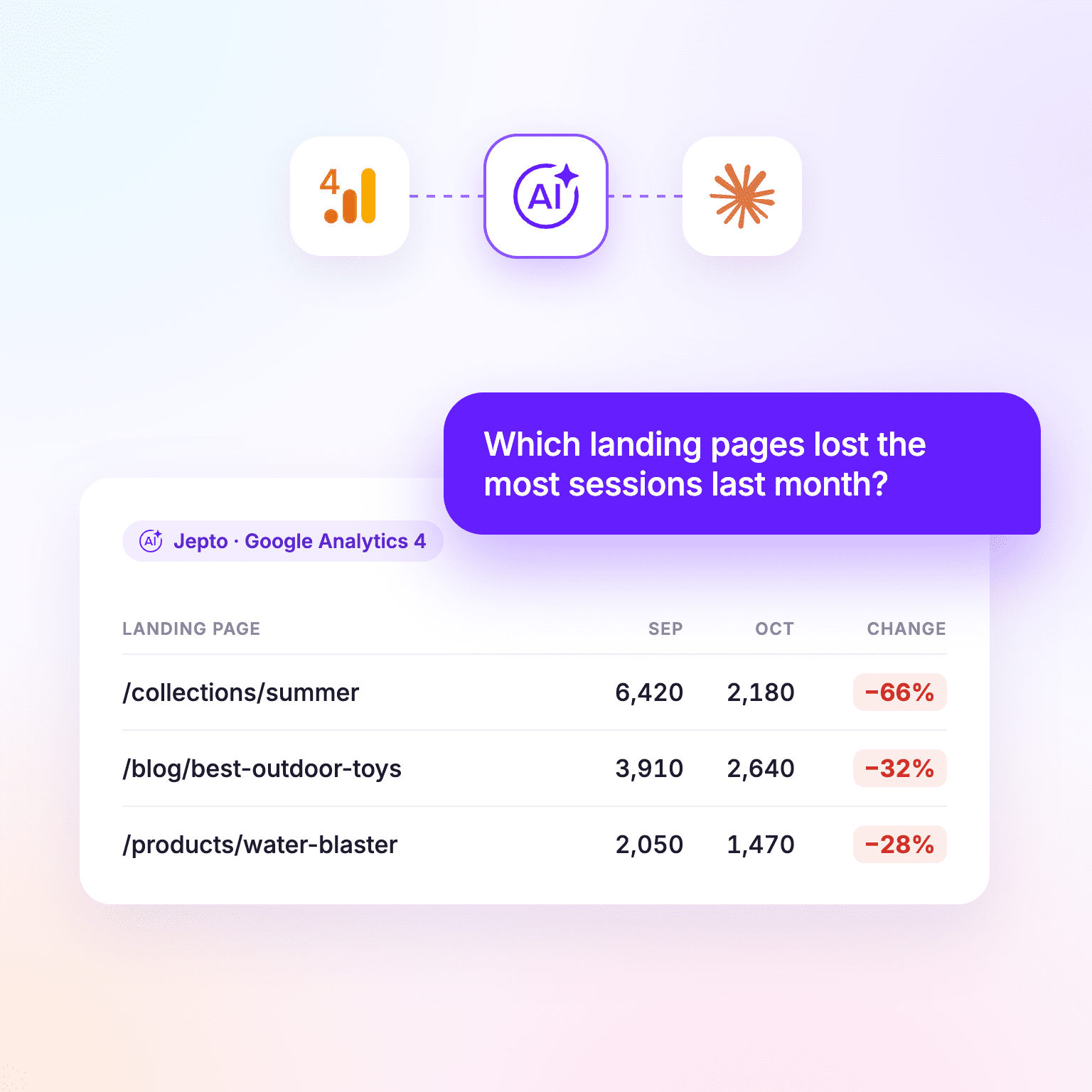
Claude picks the client and GA4 property, runs the query through Jepto and answers in the chat. Example data.
ClaudeJepto connectedJepto · analytics_queryClaude
October sessions fell most on these three pages compared with September:
| Landing page | Sep | Oct | Change |
|---|---|---|---|
| /collections/summer | 6,420 | 2,180 | −66% |
| /blog/best-outdoor-toys | 3,910 | 2,640 | −32% |
| /products/water-blaster | 2,050 | 1,470 | −28% |
More to try
Run this command, then type /mcp and select jepto to sign in:
Keep --callback-port 8787: Jepto's sign-in only returns to that port. Full instructions are on GitHub.
Google's open-source GA4 MCP server is a good fit for developers who only need GA4 and already work in Google Cloud. Jepto's server is hosted, so there's nothing to install, and it can combine GA4 with Google Ads, Search Console and other sources in one question.
Official vs hosted
Google's GA4 MCP server runs on your computer. Jepto's is hosted.
Both let an AI query GA4. The difference is setup, and what else you can ask about.
| Google's official server | Jepto | |
|---|---|---|
| Runs | On your computer, or self-hosted on Google Cloud | Hosted at mcp.jepto.com |
| Setup | Python 3.10+, pipx, gcloud CLI, a Cloud project with the Analytics APIs enabled | Add from Claude's directory, sign in |
| Works in | Gemini CLI, Gemini Code Assist, Claude Code | Claude, ChatGPT, Gemini CLI, Claude Code, Cursor, VS Code |
| Data | GA4 only | GA4 plus Google Ads, Search Console, Meta Ads and more |
| Cost | Free, open source | Included on every plan, from $10/month |
Sources: github.com/googleanalytics/google-analytics-mcp and github.com/jepto/mcp, checked November 5, 2026.
Next: See what Jepto pulls from GA4 · Jepto MCP on GitHub
Thanks a lot for your feedback! If you’d like a member of our support team to respond to you, please send a message here
Oops! Something went wrong while submitting the form.